The product's own user guide. Every screen shows Aldervane Health, a fictional organization. All data is synthetic.
1. What Ciphren is
The question it answers
What can the outside world see of us, and what should we do about it first?
Every organization has a footprint on the internet: its websites, patient or customer portals, remote-access gateways, mail servers, and the systems its suppliers run on its behalf. Security people call this the attack surface, meaning everything an attacker could reach without being let in. Attackers study it before they act. So do insurers, regulators and reporters. Most organizations have never seen it laid out in one place.
Ciphren lays it out, and then puts it in context with what's happening to organizations like yours.
Outside in, not inside out
Your existing security tools mostly look inside: antivirus on laptops, logs from firewalls, alerts from your network. They tell you what's happening on systems you already know about.
Ciphren looks from outside, the way someone with no access would. It shows:
- what's reachable: the internet-facing systems it can find, including ones missing from your own inventory;
- what's on it: the software and versions those systems reveal, and the known weaknesses in them;
- who you depend on: your suppliers' internet-facing systems, since their exposure can become yours;
- what's happening around you: news, advisories and incidents that involve you, your suppliers or your sector.
This matters because attackers start outside too. A forgotten test server or an unpatched remote-access gateway is exactly what they look for. An inside-out view can miss a system nobody knew to install an agent on.
Where the data comes from: the collection
Ciphren's data comes from a collection: a separate system, run by Ciphren, that gathers what is publicly observable about your organization, your suppliers and your sector, and analyses it.
What the collection does. It looks at your systems the way any visitor on the internet does. It asks for a web page, reads what a server announces about itself (its software and version), and reads its certificate and your public DNS and email records. It also reads news and advisories.
What it doesn't do. It doesn't log in, exploit anything, or test whether a weakness really works. So a finding is evidence of exposure, not proof of compromise.
How it knows what's yours. Each organization has a setup, agreed with Ciphren when it's onboarded, that lists its organization and affiliates, its domains, its key suppliers and its locations. The collection works from that list, and from what it discovers around it.
How often. Typically every 7 days, depending on the size of your estate, your requirements and your plan. Each organization's profile (chapter 9) shows when it was last collected and when the next collection is due. The date of the latest data is always at the bottom of the navigation bar.
Where a new instance starts. Your own picture builds from your first collection, and its history from the second: what changed, what was fixed, and how fast.
Receive-only: why the application can't reach back
The results of each collection are sent to Ciphren one way. The application you use only receives. It never connects to the collection system, and it never connects to your systems. The sign-in page calls this a data-diode feed: a diode lets current flow in one direction only.
Why it matters. The application holds your most sensitive picture: your weaknesses, and your suppliers'. Because it can only receive, nothing in it (no account, no bug, no stolen password) can be used as a path into the collection system or into your network.
What you do with it
Each page answers a question someone in your organization has to act on:
| If you are… | Start with | It answers |
|---|---|---|
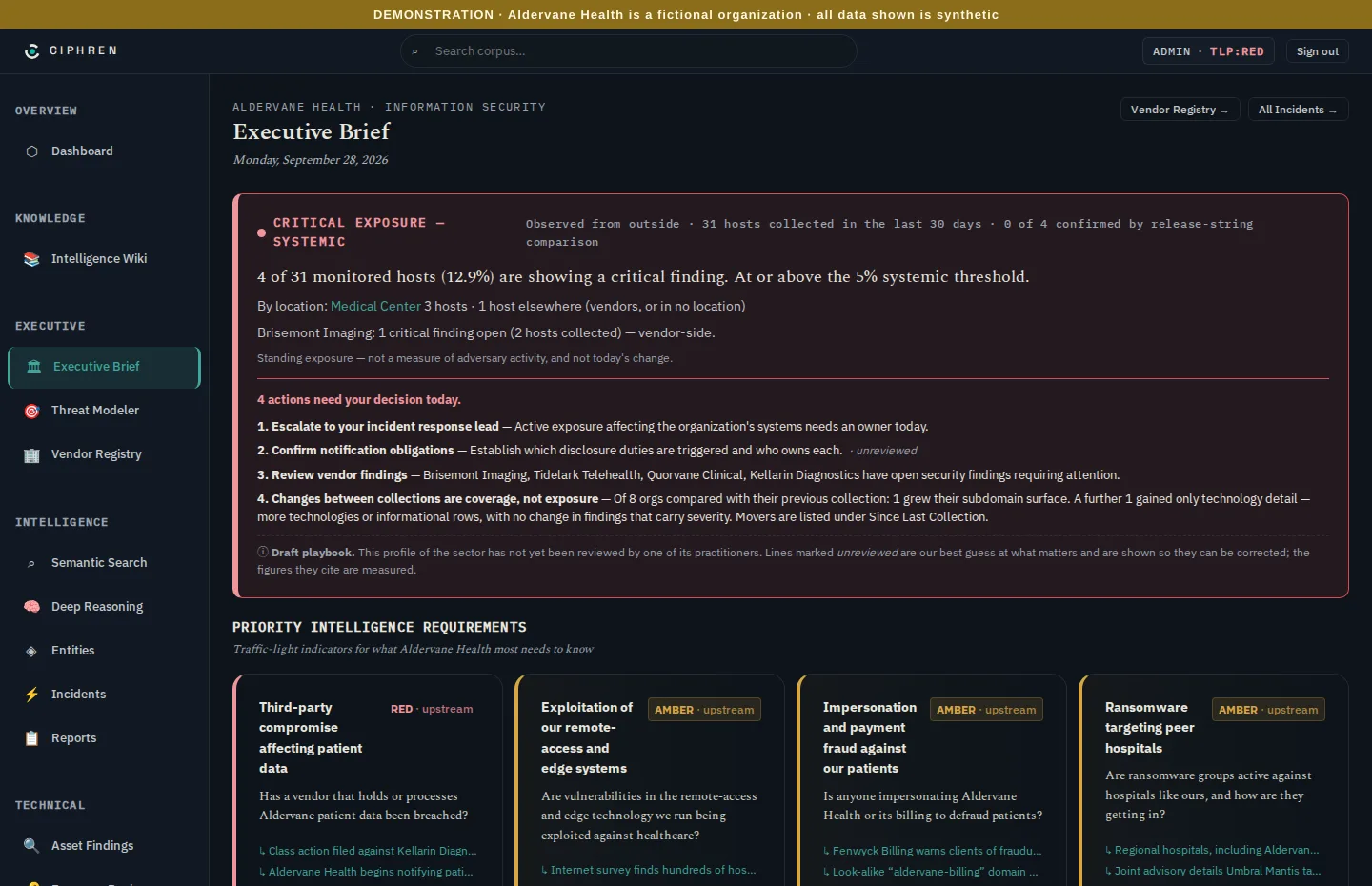
| An executive | The Executive Brief (chapter 2) | How exposed are we, is it getting better, and what needs a decision today? |
| A security lead | Findings (chapter 4) and the walkthrough (chapter 3) | Which weaknesses matter most, where are they, and who fixes them? |
| Responsible for suppliers | Vendors (chapter 6) | Which suppliers are exposed, and how badly? |
| An analyst | Incidents (chapter 7), the wiki (chapter 9) and Ask (chapter 10) | What's happening, who's involved, and what does it mean for us? |
The Dashboard, first in the navigation, is an at-a-glance summary of activity: counts, recent incidents and reports. It's a starting point for analysts. This guide starts from the Executive Brief instead, because that's where the decisions are.
Words you'll meet
This guide explains every term the first time it appears, and the glossary collects them. Four come up constantly:
- Finding: one observed weakness or fact on one system. For example: "this server runs a version of Apache Tomcat with a known, actively exploited flaw."
- Host: one internet-facing system, such as a website, a gateway or a mail server. One host can carry many findings.
- Severity: how bad a finding would be if exploited: critical, high, medium, low or informational. "Informational" means it's worth knowing but isn't a weakness in itself.
- TLP: the Traffic Light Protocol. Every item carries a marking (CLEAR, GREEN, AMBER or RED) that says how widely
it may be shared, and each person sees only what their access level allows. The header shows your own level, for
example
TLP:RED. Chapter 12 explains it.