The product's own user guide. Every screen shows Aldervane Health, a fictional organization. All data is synthetic.
8. Infrastructure
The question it answers
What does our internet-facing estate actually consist of, and is the basic hygiene in place?
Before you can defend an estate you have to know its shape: how many systems, on which domains, on which cloud providers, running what. The Infrastructure page is that inventory, seen from outside. It includes the parts your own inventory may have missed.
The whole estate
Where: navigation ▸ Infrastructure Intel (the page is titled "Infrastructure Security").
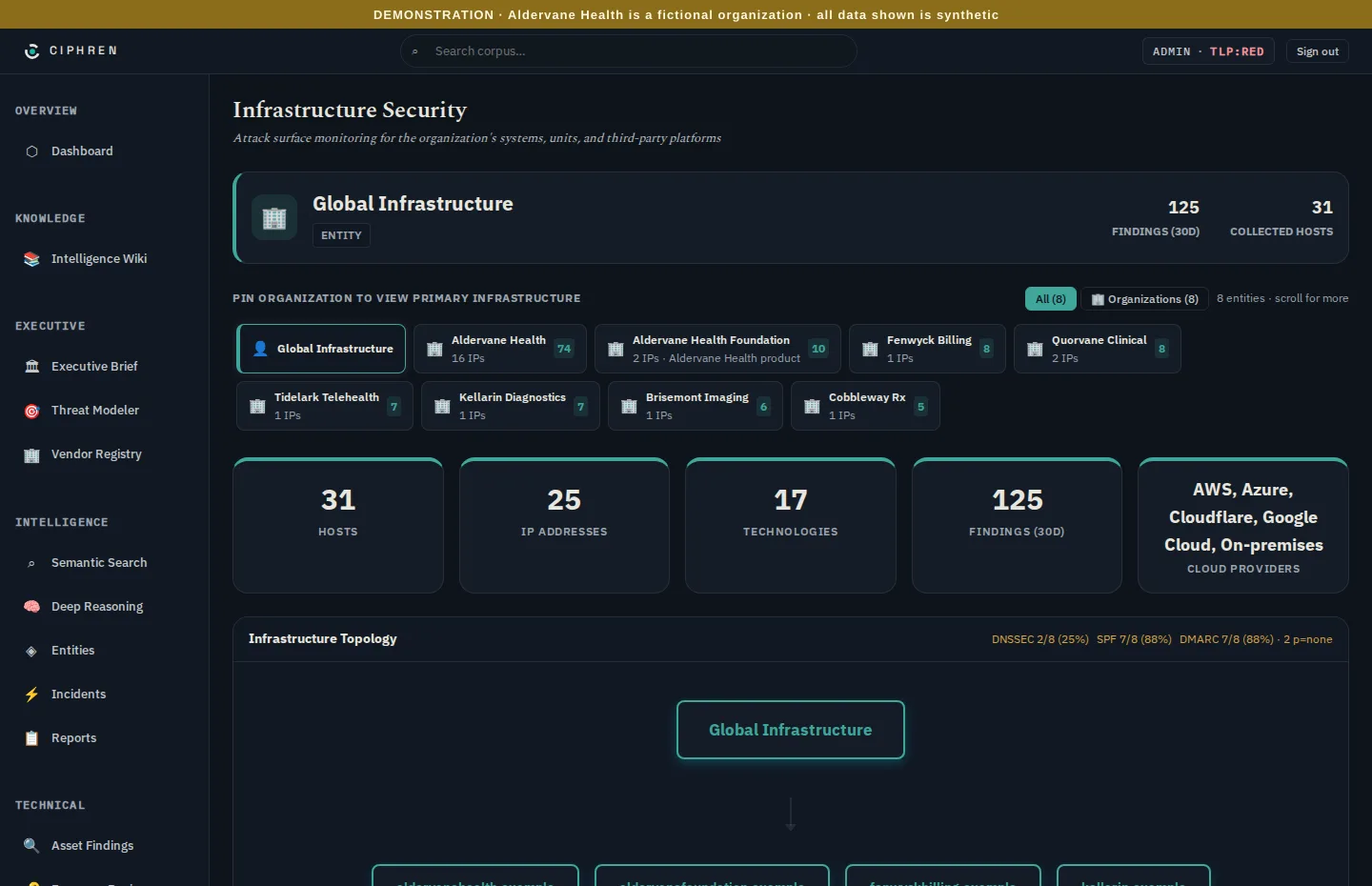
- Pin an organization to narrow the page to yourself, an affiliate or one supplier. The number on each tile is that organization's findings. Global infrastructure shows everything together.
- The totals: hosts, IP addresses, technologies, findings in the last 30 days, and cloud providers.
- Infrastructure topology: the domains each organization runs, with the hosts under each. It's often the first time an organization sees every subdomain it owns in one place, test and staging systems included.
- DNSSEC, SPF and DMARC coverage, top right, as counts of domains. The DMARC count includes monitor-only domains, and the note after it ("· 2 p=none") says how many of them there are. DNSSEC signs a domain's DNS records, so the answers to "where is this site?" can't be forged. SPF and DMARC are explained below.
Why it matters. Most breaches through the internet-facing estate start on a system nobody was watching. If the topology shows a host you don't recognise, that's a finding in itself: find its owner, and decide whether it should exist.
Hygiene: encryption and email
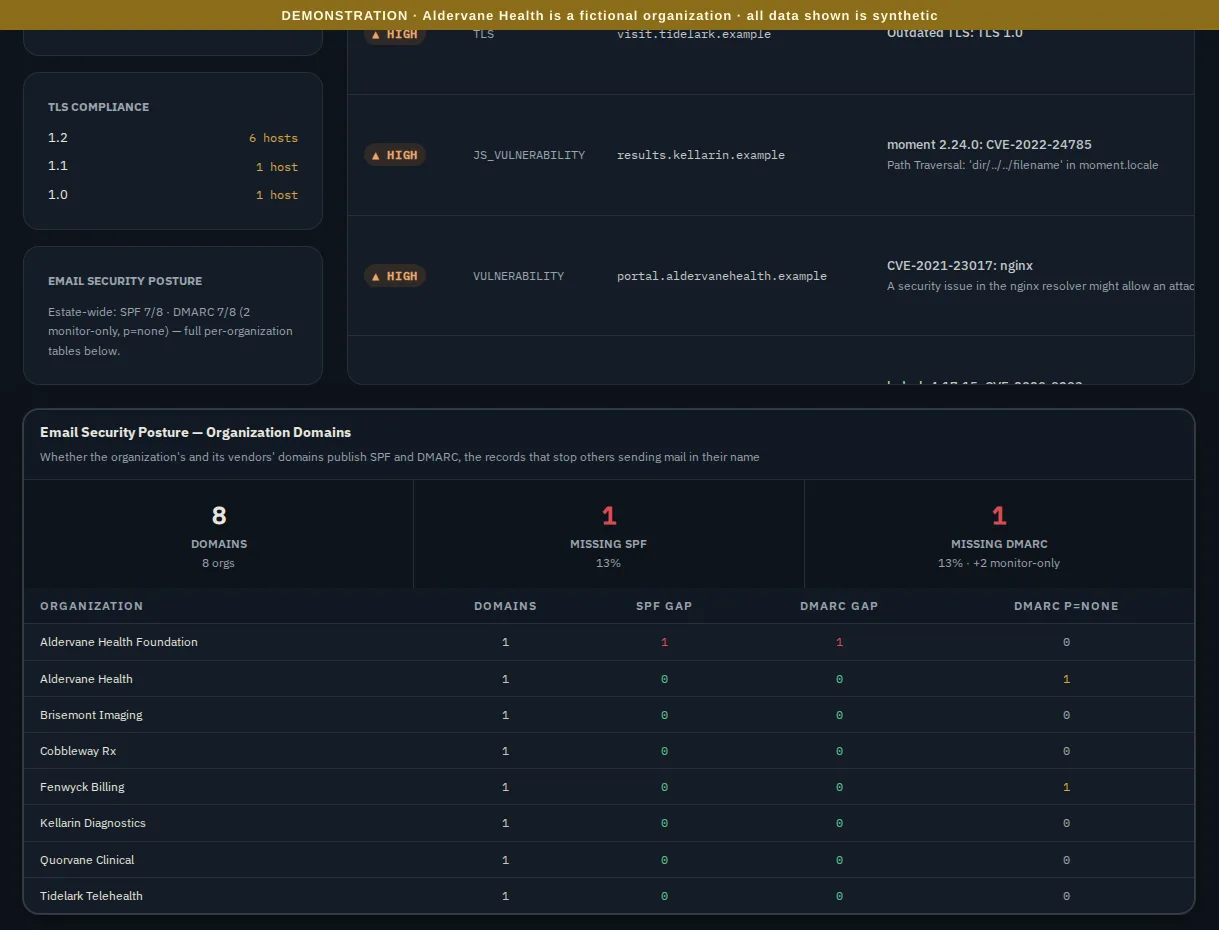
TLS is the encryption between a visitor and your site. Ciphren flags anything below the current version, 1.3, and rates it by how old it is:
- TLS 1.0 and 1.1 (high): retired. Modern browsers refuse them, and so do most compliance regimes. Fix these first.
- TLS 1.2 (medium): still widely accepted, but no longer current. Plan the upgrade.
Email posture checks two published records on each domain:
- SPF: which mail servers may send email as your domain.
- DMARC: what receivers should do with email that fails those checks, such as reject it, or only report it.
A domain with neither can easily be impersonated in email. That's how invoice fraud and phishing "from" your
organization start. A DMARC policy of p=none is monitor-only: receivers report failures but still deliver them.
It's a normal first step, but not protection.
In Aldervane's case, the foundation's domain has neither record, so the foundation could be impersonated to donors.
The table lists each organization's gaps. Aldervane's own domain and Fenwyck Billing's publish DMARC at p=none.
That isn't counted as a gap, but it isn't counted as protection either: the table's DMARC p=none column and the
Missing DMARC tile ("+2 monitor-only") show these domains separately.
What to do with it
- Once: walk the topology with your infrastructure lead. Every host should have an owner, and every surprise should have an explanation.
- Retire old TLS: 1.0 and 1.1 first. They're usually on old appliances or forgotten test systems.
- Close email gaps: publish SPF and DMARC on every domain that sends mail, then move DMARC from
p=nonetoquarantineandrejectonce reports show legitimate mail passing.