The product's own user guide. Every screen shows Aldervane Health, a fictional organization. All data is synthetic.
6. Vendors
The question it answers
Which of the suppliers we depend on are exposed, and how badly?
Your organization's risk doesn't stop at its own systems. The electronic health record, the billing platform, the lab's results portal and the imaging archive all run on your suppliers' systems, and they often hold your data. When a supplier is breached, the notification duties and the patient calls are often yours.
Ciphren watches your key suppliers' internet-facing systems the same way it watches yours. It grades them all the same way, so you can see which ones to talk to first.
The Vendor Registry
Where: navigation ▸ Vendor Registry (the page is titled "Third-Party Platform Registry").
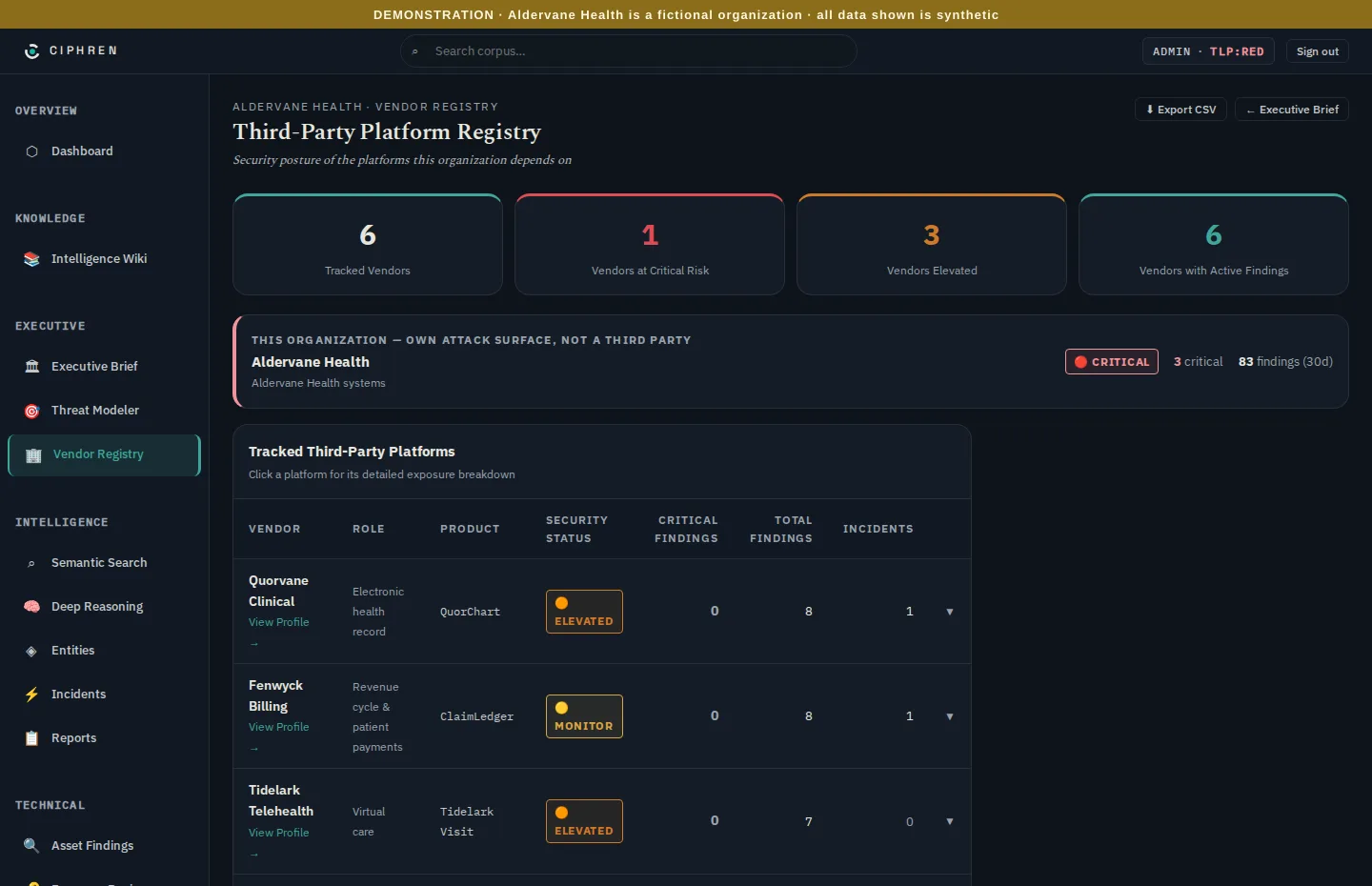
The registry lists every tracked supplier with its role (for example Electronic health record or Reference laboratory), its product, its grade, and its counts of findings and related incidents.
The grades, shown in the Security Status column and the same everywhere in Ciphren:
| Grade | Means | What to do |
|---|---|---|
| Critical | At least one critical finding on the supplier's systems | Contact the supplier now, with the finding as evidence |
| Elevated | High-severity findings, none critical | Raise it at the next review; ask for a remediation date |
| Monitor | Some findings, none high or critical | Keep an eye on the trend |
| Clear | No open findings | Nothing to do |
Your own organization appears at the top in its own box, marked own attack surface, not a third party. It's there for comparison: your suppliers are graded the same way you are.
Incidents counts security stories about the supplier. Ordinary business news, such as a supplier announcing new customers, isn't counted. A supplier with few findings but several incidents (Kellarin Diagnostics has four, about a breach of its results portal) needs a different conversation from one with many findings and no news.
Click a supplier's row to expand it, or View Profile → for its full page.
A supplier's page
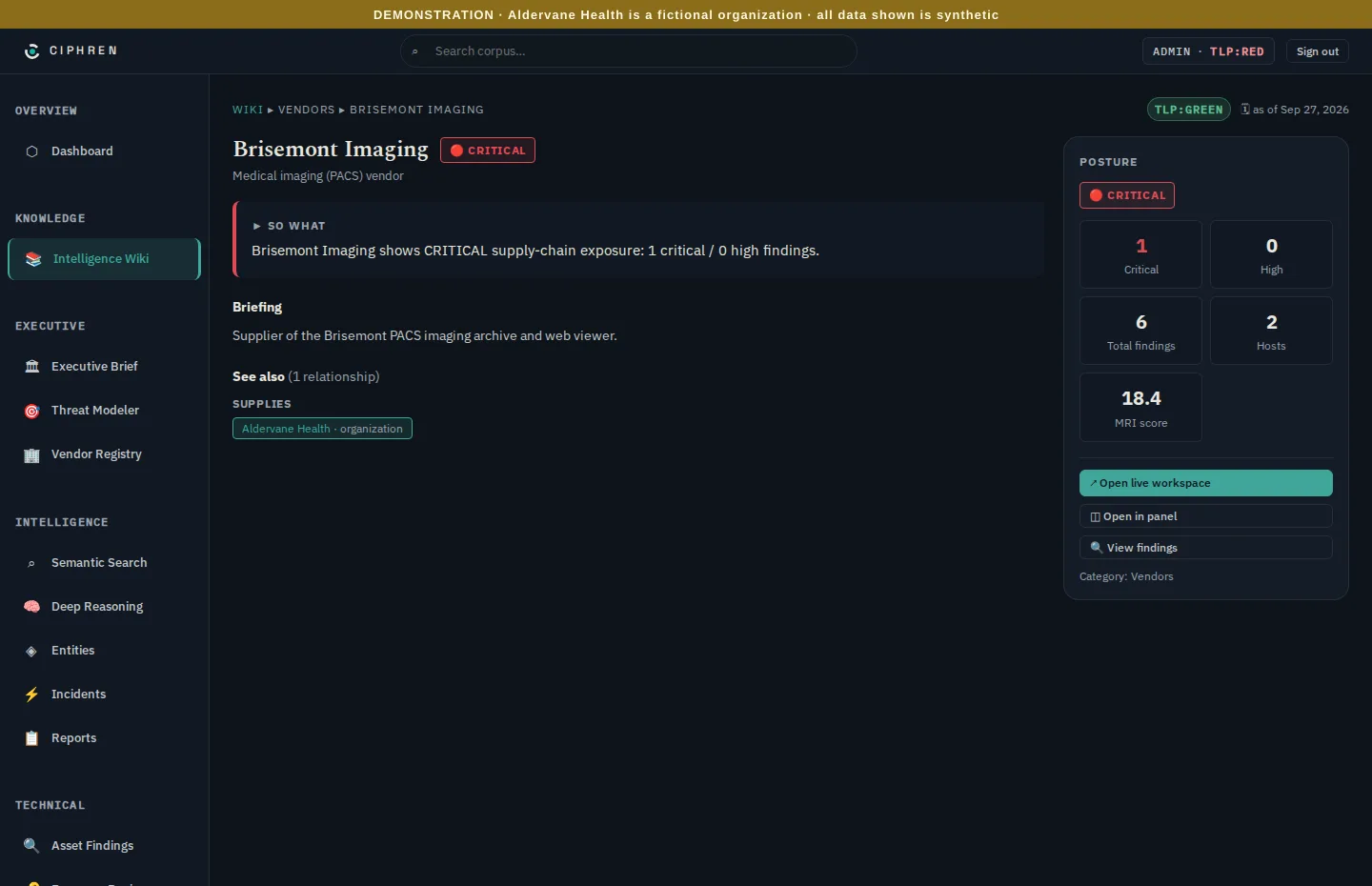
Each supplier has a page in the intelligence wiki:
- So what: one line saying what its grade means.
- Briefing: what the supplier provides to you.
- Posture: critical and high findings, total findings, hosts, and its MRI score. That's a single exposure score (chapter 2) you can use to rank suppliers against each other.
- See also: how it's connected to you (supplies Aldervane Health).
- View findings: its findings, ready to share with the supplier.
Why a Critical supplier can have a low MRI. Brisemont Imaging is graded Critical with an MRI of 18.4. The grade follows the single worst finding: one critical is enough. MRI adds up all of a supplier's exposure, so a supplier with one serious flaw and little else scores low. Read them together: the grade says how urgent, and MRI says how widespread. (PACS, in Brisemont's description, is a hospital's medical-imaging archive.)
What to do with it
- Quarterly supplier reviews: open each supplier's findings and ask for dates. A finding is specific, dated and observable, which gives the conversation something concrete to work from.
- When a supplier is in the news: check its page first. Do you depend on it, what does it hold, and is anything already open?
- When choosing a supplier: a candidate's visible exposure says something about how it runs its systems.